
• expired

Samsung 256GB NVMe SSD (MZ‑VLB2560) $29.98 + $4.90 Shipping ($0 C&C/ in-Store AKL) @ Electus Computers

100

Drove over to their Manurewa shop and got one today, cheapest I could find from a retailer so far. I think they are second hand as they don't come in any sort of packaging, they just hand it to you in a little white bag.

Could be handy for cheapies looking for cheap but okay speed memory. I wouldn't use it to store valuable things, but should be fine for the other junk.

With SSD prices starting to skyrocket, I figured its now or 2028 for extra storage.

Related Stores

electuscomputers.co.nz

Comments

Search through all the comments in this post.
  • +1

    PBTech have these on special often at around $25 (not at the moment though). If you're lucky you get a PCIe 4.0 one. But 256Gb NVME are never that speedy compared with larger capacity ones. Good for boot or small backup drives I guess.

    • +3

      Just checked and they have them but far higher prices than the $25 they were selling them for. Unfortunately I think the days of $25 cheapo ssds pulled from oem systems are behind us for a while.

  • +6

    I put a 2240-sized NVMe in a slim $16 enclosure and use it as a USB drive. Super fast compared to the alternatives, and cheaper too.

  • Might grab a couple to test as an SSD cache on truenas. Only want 2 so there's redundancy if one dies mid write. Is 256gb big enough for that use though would be the question.

  • +2

    They increased the price to 33.50

  • The drives in question also don't appear to be new. Nothing mentions that they are pulls from recent or new systems, instead it explains there is a 6m warranty and some unspecific words on condition.

    I'd give them a pass.

    • I fully expect them to be flogged and used mercilessly for a decade. I got one from them today, looks good enough, but yeah wouldn't trust for anything important. Maybe my games

      • Have you ran a crystal disk info? That may give you some idea how worn out they are

        • +4

          I didn't know that existed, but just ran one now, here is what I got;

          SAMSUNG MZVLW256HEHP-00000 : 256.0 GB
          Health Status: Good - 94%
          Total Host reads: 14309 GB
          Total Host writes: 20323 GB
          Rotation Rate: —-
          Power on count: 3518 count
          Power on hours: 3489 hours
          Transfer mode: PCIe 3.0 x4 | PCIe 3.0 x4
          Standard: NVM Express 1.2
          Features: S.M.A.R.T., TRIM, VolatileWriteCache

          I think every drive will be different though, so maybe I got lucky with this one

          • @jjjj: Doesnt look too bad at all

            • @dealllllll: Depend on what you store on it.

              • @kyogui: I meant health rating. I was expecting really low figures like 20-30%

                • @dealllllll: I don't think I've ever seen anything that low before, it normally dies before then

          • @jjjj: Even these 10yr drives are good for at least 100TBW (in reality its probs good for around 300+). This ones only written 20TB so you've got plenty of life left in it.

  • Reason to use this undersized drive in todays world?

    • +1

      boot drive and installing a couple of apps on it in a laptop/pc

    • I got a couple of the super cheap 128gb ones from pb tech. They are fine to boot from and great inside a nas or router where you'll never come close to using 128gb.

    • I have 2 (256gb & 128gb) as cache drive on my unraid server. Another mini pc running proxmox has 128gb which is only 70% full. So there are lots of use cases if you are into homelab.

      • Do you have your cache in an array? I'm looking in to doing this soon when. I finally move to my newer box that has m.2 sockets and read up on the advice that you should have redundancy in the cache in case it fails before committing the write to the storage pool. I've got a spare 128gb, 512gb and maybe 256gb drive depending on if I bother moving my boot drive from the old sata SSD but thinking it makes sense to maybe pick up one of these to pair with the 256gb I already have and keep the 128 and 512 for boot drive or storage purposes.

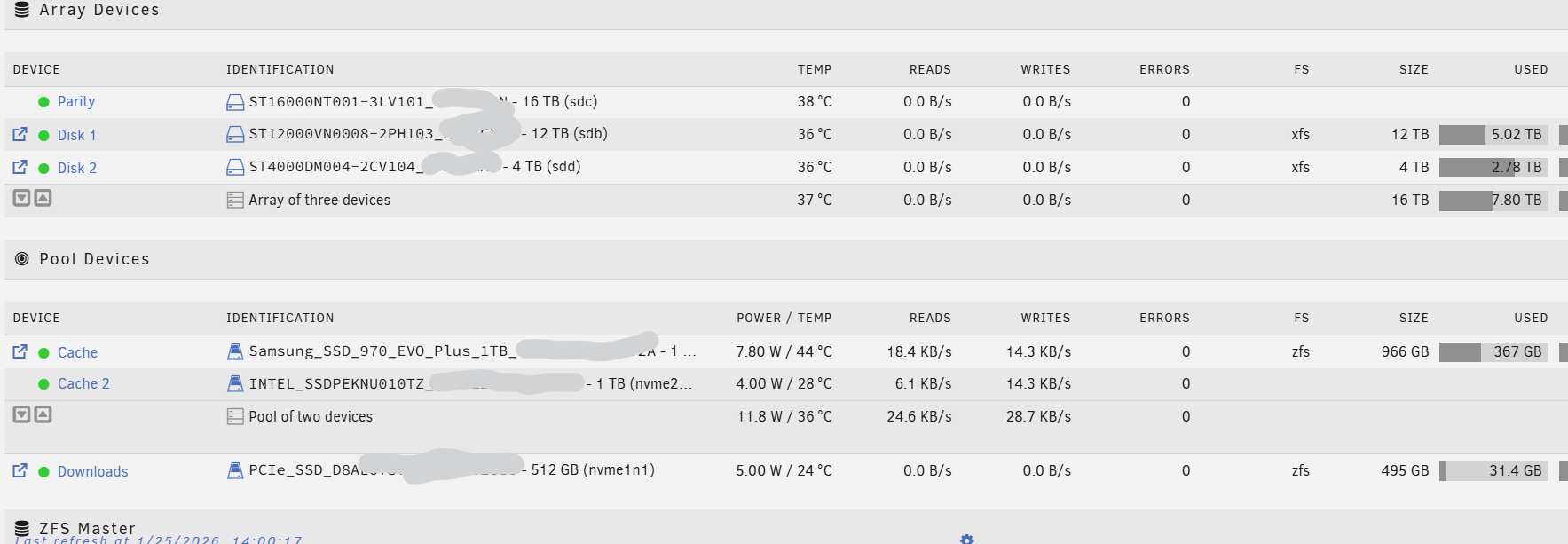
        • Yes. I have 2 x 1tb nvme zfs (mirror) appdata cache. Additionally another 512gb nvme as my downloads drive. All my media downloads go to appdata cache and stays in there for another 10 days. After that it gets moved to array. Normally I watch tv shows within a week and gets deleted so most times it is not moved to array. Movies are different. I have another mini pc running proxmox. Got 2 instances of plex running, one on each server. One is bound to all arrs downloads & other one is bound to cli-debrid service. Any downloads by debrid service uses 512gb drive. So far this has been working great.

          This is how it looks currently. More details here

    • Use as storage drives instead of usb sticks for speed, makes it easier to install games.

  • +1

    They're now price gauging at $37.50!! Crazy for second hand nvme.. well there goes cheap nvme drives

Login or Join to leave a comment