

EARLYBF
PB Tech Deals Database was last updated on "Check site header to see info"
Check the "What's New section on the header of the site to see changelog"
Hey Cheapies Community,
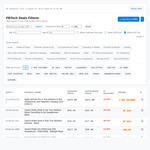
With the PB Tech "early" Black Friday deals starting up, I wanted an easier way to sort through them all instead of just scrolling endless pages.
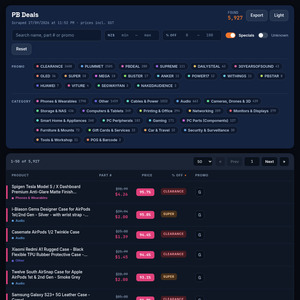
So, I built a small website that shows all the deals and puts them in a clean, searchable table. I'm pretty excited to share it and really hope it's useful to the community for finding a good bargain!
It lets you:
- Search for specific items (e.g., "phone", "laptop case", "ssd")
- Filter by discount percentage (from X% to Y%)
- Sort by name, price, or discount
- Toggle dark mode
- Copy a markdown table of your filtered results
I'm hoping to keep it updated as more deals drop. Let me know what you think!
Cheers!
Edit: Best viewed on desktop/laptop
Admin, I'm just a community member excited to share a tool I made. I hope it's okay to post this! If not, please feel free to take it down. Thanks!
**Update 2026*
Hey everyone, apologies for the radio silence on pbscraper — life got in the way for a bit!
The site is now fully updated with the latest pricing. Moving forward, I plan to keep it updated manually whenever PB Tech runs major promotions and sales.
Thanks for your patience, and hope it helps you hunt down some good bargains!
Update V3.3
-Added Last set of BF Deals
-Slight UI Update
MAJOR UPDATE V3.2
New Domain Name
I am glad to introduce version 3.2 which brings a major performance overhaul. Based on community feedback, I have implemented pagination so the site no longer tries to load 15,000+ deals at once. This drastically improves load times and makes sorting and filtering instant.
Thanks again for the support and happy deal hunting!!!
UPDATE V2.0
Thanks so much for all the amazing feedback! I've been busy pushing out an update with all the fixes and suggestions you made.
Here's what's new in the latest version:
GST-Aware Price Filter: This was a big one! The "Min $" and "Max $" price filters are now "GST aware". They will correctly filter against the GST-inclusive price when the GST toggle is on.
GST on by Default: As requested, the "Show GST Inc." toggle is now on by default.
Search is Fixed: The manual search is no longer "jank" 😄. It now works just like Ctrl+F and will find brands like "msi", "samsung", "vacuum", etc., without any issues.
"Hide Accessories" Button: This is still there to easily hide all items tagged as "case", "cable", or "accessory" so you can find the main deals.
[ BETA ] Smarter "Quick Filters": The "Phone", "Laptop", and "PC Parts" buttons are now much more powerful. Instead of just searching one word, they now search for dozens of relevant phrases (like "msi gpu", "intel i5", "samsung galaxy s", "dell xps", etc.) to find the actual products you're looking for.
Thanks again for all the suggestions—it's made the tool so much better. Let me know what you think!
MAJOR UPDATE
Hey everyone,
I've just pushed a big update to the PB Tech Deals page. Here's a quick summary of what's new:
New Features
New "Quick Search" Menu: Replaced the old filter buttons with a powerful Category > Brand > Product Type dropdown menu.
New "Google Search" Column: Added a "G" column with a clickable icon to search for the product on Google.
New "Promo" Column: Moved promo codes into their own dedicated column for better visibility.
Wildcard Search: The main search bar now supports * as a wildcard (e.g., NBKMSI******).
Fixes & Improvements
Mobile View Improved: The table is now much cleaner and easier to use on mobile devices.
UI Cleanup: Removed the old "Quick Filters (BETA)" row to simplify the layout.
As always, let me know if you run into any bugs. Oh, and also, I have added a Buy Me a Coffee link… If you find this tool helpful, you can now support the page via the new "Buy Me a Coffee" link (no pressure at all!).
Happy deal hunting!
MAJOR UPDATE (V2.0 + V2.1)
Version 2.1 - 11/11/2025
Added this "What's New" popup!
Added a "Last Scraped" timestamp to the top of the page.
Fixed a bug where promo filters wouldn't reset properly.
Version 2.0 - 10/11/2025
Major Feature: Added Promo Code filters!
You can now filter by specific promo codes like "BFDEAL" or "CLEARANCE".
The filter bar has been redesigned to support this.
(I am not Affiliated PB Tech nor does it contain referral links)



I just reported it for mods to give you an associated badge since it's your webpage (in response to comment at the bottom of your post).