
Marketplace


I've been trying all sorts of different keyboards in past 2 years after Microsoft stopped their Sculpt Ergonomic Set (Yes I know Incase picked up the production line and started making MS keyboard & mouse again at the beginning of this year).
For all these keyboards I tried, Perixx's 835 almost ticked all the boxes but it has the number keys which made it too wide that you can't have the keyboard in the center of your body while still comfortable use the mouse(too far away). Perixx's 335 don't have the number keys but it is not wireless.
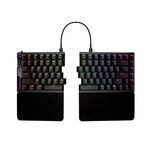
I started using the Falcata last month and after some modifications I think this might be the one that I can settle down. I got it from PBTech for $500 at the beginning of this year(out of stock at the moment: https://www.pbtech.co.nz/product/KEYASU1020/), so $395 delivered is a pretty good deal.
To make it comfortable enough for me, here is what I did:
1. Rise the tent by printing leg extention: Asus Rog Falcata foot extension
2. I made a wrist riser and printed in TPU: Asus ROG Falcata wrist rest riser@MakerWorld Or Asus ROG Falcata wrist rest riser@Printables
3. I replaced all the keycaps to JWA low profile(The low profile key caps in my above model photos are not JWA, they are NyPhy flat low profile keycaps, these are not comfortable, please don't use them).
 CamelCamelCamel.
Most custom-made keyboards are missing the F row which is essential to me.
I have Keychron K15 Max and Weekin Alice 3 Split, the standard "Alice" layout feels weird due to the strange angle in the left "2qaz" and right "-p;." column, these keys have a large gap between neighbor keys and with the angle they hurt my pinky finger when trying to reach them.
It feels much better to have a small 'curve' instead of a sharp angle, like MS Sculpt Ergonomic Keyboard, or the BAlice80, which currently only support bluetooth. I'll try the BAlice80 once they have the 2.4Ghz version.
I don't know why almost every custom keyboard is using the "Alice" layout and call it ergonomic. To me Microsoft and Logitech's split layout(small curve instead of straight then a strange angle) that is designed by professionals based on real studies and tests simply wins the "Alice" that designed by one man according to his own needs.

Fair enough re: F-row. I've never had a problem with Alice, especially when tented - it subjectively feels much, much better than the MS layout, which I've always found caused wrist pain for me (and caused annoyances when switching back to a standard layout). I guess everyone has different preferences - at the end of the day, any layouts fundamentally based on QWERTY aren't going to be the best to type on.
For the record, the designer of the TGR Alice didn't come up with the layout - it had been around beforehand (e.g. in the EM7).
at this price, surely just build a Neo Ergo or QK Alice Duo, both of which are significantly nicer in every way