
• expired

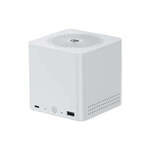
Beelink ME mini 6-Slot NAS PC Intel N150 $349, with Pre-Installed 2TB SSD $649 + Shipping from $14 @ NotBadTech

110

Bit of a niche deal, but it's good value considering 12GB DDR5 and a 2TB SSD alone are around $300 and $400 respectively.

The units have a 2TB SSD pre-installed by the manufacturer originally, if you go for the version without the SSD, we will be removing the pre-installed SSD.

$649 With Pre-Installed 2TB SSD
$349 Without Pre-Installed 2TB SSD

I've just removed the pre-installed drives from a couple of units and the model seems to be the Crucial P3 Plus 5000MB/s PCIe 4.0 drive - CT2000P3PSSD8B.
Can't guarantee they will all have the same model drives, but it's likely.

Specification Details
Model Beelink ME Mini (Pearl White)
Processor Intel Twin Lake N150 (4 Cores / 4 Threads)
Clock Speed Up to 3.6GHz
Memory 12GB LPDDR5 RAM
Internal Storage 64GB eMMC (Onboard)
Storage Expansion 6x M.2 SSD Slots
Networking 2x 2.5GbE RJ45 LAN Ports
USB Connectivity 1x USB 3.2 Gen 2 (Type-A), 1x USB 2.0, 1x USB-C (Data Only)
Video Output 1x HDMI 2.1
Dimensions 99mm x 99mm
Operating System No OS pre-installed

Previous post for the same product but with an N95 instead of N150 and 16GB DDR5 instead of 12GB.

We also have a more powerful Beelink Mini PC that is good value currently -
$950 Beelink EQi12-D4 i5-12450H 32GB 1TB SSD Mini PC

Related Stores

NotBadTech
NotBadTech

Comments

Search through all the comments in this post.
  • "12GB DDR5 and a 4TB SSD alone are around $300 and $400 respectively." Would be better to have a direct comparison of the price of a 2TB SSD rather than a 4TB. I would definitely pay $100 more to get double the storage so not really sure why any one would opt to pay $300 for 2TB.

  • Amazing price!

  • Would people use this as NAS?

    • +2

      You can but it'll be pricey to kit out now with nvme storage. You could do a decent amount of app installs on an n150 with 12gb of ram and if you know what your doing it could do more than being a nas. It would also run home assistant and things like immich or Plex/jellyfin fairly well.

      • Seems like the N150 handles transcoding really well thanks to Quick Sync so this has the potential to be a really efficient Plex Server.

        I've been tempted to grab one of these a few times to play around with as a dedicated Immich server, to roll my own router etc… and this deal currently has me trying to talk myself out of it 😅

        • It works really well. I have n100 mini pc and plex has been rock solid. It has played everything so far.

        • +1

          I'm sure it would be fine, only problem for plex is just the price of ssds to get enough storage for your library now. At $200 a Tb you'll be spending double the devices price to get 2Tb with parity. For immich I think you'd be ok with 2 drives but it's will expensive to kit it out. I keep hoping something like the wtr pro will be affordable to pair an n150 with 3.5 inch spinning drives, then use smaller ssds to cache to bring the price point down.

          • @Everettpsycho: I just got a minisforum N1 Air. Awesome 255 H cpu, 5 bay and 5Gb and 10Gb nics on board. Less than USD 499 plus shipping currently, direct from their website.

  • I've got a similar N150 mini PC with 4 x 2.5gbe it's exceptionally good for a home router/plex/samba fileshare/torrent server using proxmox

    Needs a bit know how to set it up.

  • Unrelated but I wonder if you got any good value Monitor for sale? Going for mid to high end.

  • +1

    Any idea if this would handle emulation games well, and up to which console it'd support? It would be nice to gift my brother an emulator console

    • +1

      Have you got anything else on the list? These are more for home media,automation and servers.

      It should play upto gamecube, it can handle some pc games on low.

      I would get something designed for gaming.
      Some rog allys and msi claws were selling under the $500 mark.
      https://www.notebookcheck.net/Intel-Processor-N150-Processor…

      https://www.youtube.com/watch?v=7lvwB6M5N-c

      • +1

        You'd probably be better buying an old office PC. You can get older high end cpus that sometimes have workstation gpus in them for this price. They offer faster higher core count cpus that would suit gaming more than an n150. The n150 is more efficient and good for low power workflows or where power draw is important.

        Check out eta prime on YouTube for a lot of those style builds in workstation computers as you can get a lot of performance in a budget.

        • Yes its more economical especially with ram and ssd prices,

          • @coffeee: Old pcs use a lot more power though, N150 is very efficient power wise.

    • Raspi pi with that emulator thing on it. Can play up to ps2 iirc.

  • Awesome price mate
    I got me one of those a little while back. Used to keep my files on a couple of 2tb NVMe's that I picked up when they dropped to $100 per tb. Wanted to replace old desktop that I use as a file store. And to also use it as a media player.

    In short it is struggling… Probably not best my for my needs.

    The good
    - great design small, tidy, quiet and discreet
    - early reviews complained about disks overheating and recommended heat transfer pads. Well my version came with those
    The ugly
    - I run Windows 11 yeah yeah. 64gb is just not enough for it…
    - it does feel slow doing things from that 64gb - starting up, upgrading, installing
    - 4k playback is stuttering. FHD is fine but in 2026?!
    - it is quite warm sitting idle. Not really a problem but I only have two low class ssds in it
    - I can't seem to get my old VM up on this. Player installs fine but wires starting up. Not an expert on this, maybe someone can comment.
    - no BT. Well, this is easily solvable for $20…

    • If all you are using it for is serving files and watching media you'd probably solve all your issues dropping windows and installing something like truenas, open media vault or zimaos, then pairing it with a android tv or fire stick for the media playback. It's a very capable chip in this for a media & file server with a lightweight os installed. If you are going to be adding Bluetooth to it anyway put that $20 in to a device that does native Bluetooth and you'll probably have a nice experience all around.

    • This are good for linux/proxmox/nas os. Windows works but not good for n series processors.

    • To reiterate plainly what the other two have said, Windows is your problem here.

      • It is me being lazy and short on head space. Getting Linux installed, plus configuring it to file share to the Windows PCs on the network. Finding a player that plays all the random codecs… Getting the VM to work (mind you the stupid thing doesn't run in windows on this build anyway).

        But if any of you good folks can point me in the right direction I might bite the bullet, give it a go and report back. Believe it or not my trade used to be IT but I feel I'm getting too old for this s..t. Just want it to work :)

        • I'm with you 100%. As time goes by I'm getting less and less joy out of tinkering with this stuff and leaning more toward paying a bit more for something proprietary that works out of the box.

          • @ABCDEFG: Ahh, the thrill of successfully configuring ipx/spx on your windows 3.1 to be able to run a 4 way deathwatch in Doom2…

        • I'd suggest looking at my list above, if you have some spare old devices give it a try on there first. NAS can be a pain and obtuse but generally setting up an smb share and media server on them is pretty simple. Install the OS, establish a drive pool and share it to your network devices using smb.

          For media install Plex or jellyfin app and point it at your drive pool. Then install the appropriate app on your streaming device.

          It is more learning than doing nothing but I reckon with a simple YouTube guide you could be up an running in an hour or 2. Biggest time sink will be transferring data around as you probably can't leave your drive in place for this and will need to copy everything on to the new drive pools.

          I'd steer clear of proxmox if you don't want to muck about, just go with a relatively simple nas os and if you want things like home assistant later you can install on to there.

  • I've just bought two and I'm not sure if I'm regretting now I'm looking at m.2 prices.
    Anyone got a good source for drives?

    • +1

      Not a good time to buy anything RAM or SSD ATM. But keep an eye on ozbargain. People do report deals.
      I.e. 4tb for AUD400 https://www.ozbargain.com.au/node/949850.
      This was AUD300 a year ago.

    • +1

      2TB Kodak X300S @ NBT for $395 is about as good as you'll get price wise
      2TB Crucial E100 @ PBTech for $401

      4TB KLEVV CRAS C910 @ Mwave for AUD $573.58 (approx. NZ$ 681) delivered
      4TB Fikwot FN960 @ Aliexpress for approx NZ$588 delivered.

      All fairly low end QLC drives but the M.2 interfaces on this device are almost all PCIe 3.0 x1 (only is x2 I think) so pretty much any NVME drive will be speed limited by the interface anyway.

      Or just by 5 of the cheapest 256Gb drives you can find to add to your 2Tb one making 3.25Tb total. Or whatever capacities you can find from Marketplace. Unraid or OMV with MergerFS and SnapRAID could work quite well for different capacity drives.

    • +1

      We have Corsair MP600 Core XT 2TB 5000MB/s PCIe 4.0 M.2 NVMe SSD for $395.

      We'll sell the 2TB pulls from these separately if enough units are sold without the pre-installed SSD, probably for $350.

Login or Join to leave a comment