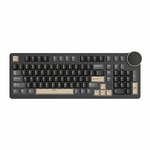

RKccn99
RK ROYAL KLUDGE N99 Wireless Mechanical Keyboard
Features:
Special: Multi-Funtion Screen
Keys: 98 Keys
Mode:Wired/Wireless
Structure:Gasket
Keycaps:PBT
Bettery: 7200 mAh


RK ROYAL KLUDGE N99 Wireless Mechanical Keyboard
Features:
Special: Multi-Funtion Screen
Keys: 98 Keys
Mode:Wired/Wireless
Structure:Gasket
Keycaps:PBT
Bettery: 7200 mAh
Hi friend. N99 is the most popular product now. It might be a bit hign price but it have lots of features.

Do you have to install software to use the multi-function screen for controlling keyboard functions and media?
I am genuinely considering it, but I CBF on vendor software.
I presently have an HP Omen keyboard and it forces the HP Omen software, and they replaced the Home button (which I use regularly because I manage Linux terminals via the CLI) with an Omen button which opens the Omen software and you can't restore it back to a Home button. I pulled the keycap off so I don't accidentally hit it.
It is for this reason I am looking for another keyboard and don't want to install an application to manage backlighting etc.
If I can set the backlight to a nice mild red, and control volume, without having to install software, I will buy one. I don't care about any other functionality.
Edit: Also I don't know how your switches are defined, are any of them clicky?
If you're only using basic functions such as volume control or lighting, there's no need to install the software; however, if you require more advanced features, you'll need the software to enable them. In addition to the software, we also provide a web-based version of the driver.
@Royal Kludge: Cool, good answer. I'll buy one then.
Edit: There's no end button!
Nor insert or delete, that would kill me on the terminal. Copy and paste would be a nightmare.
I'll buy that other one you posted.
@Royal Kludge: Nah, both of those would be super difficult in the terminal.
Copy and Paste via a Linux Terminal is Ctrl/Shift-Insert, and it gets used a lot, so adding an extra button slows you down.
Doesn't matter anyway, I've already ordered the R108 you posted, order 1418.
@Royal Kludge: Just received the keyboard, just a bit of feedback on the R108 as there's a couple disappointing areas.
The first isn't very important, it's a hard cabled keyboard but it doesn't have a hard cable. Additionally there's space for two USB ports but they don't exist. It would be better if it had a hard cable, and those USB ports existed.
The real disappointment, and I think this is VERY unclear on the website, is that the keycaps have no transparency on the letters rendering the backlight near absolutely useless. They look lit up in the pictures, but the backlight barely serves a function as a result of this. As an example the Fn button is in a weird place, and coding at night in the dark this will make it hard to find.
The inclusion of some spare switches, though, is very good.
@[Deactivated]: On the other hand, I like the subtle flash under the key when it actuates. Good subconscious feedback out of the corner of my eye.
@[Deactivated]: Hi friend. Since aesthetic considerations, most keyboards on the market feature non-transparent keycaps. K keyboards are supposed to come with connection cables. Perhaps the cable isn't what you think of as a hard cable. The R108 doesn't mention having two USB ports; maybe you're confusing it with the N99.
@Royal Kludge: That's fine, please see my feedback above again, I am not asking you to fix my keyboard, I'm using it now and I am not looking for a return.
This is just feedback on the product you made, perhaps it can guide future product developpment for you.
I don't really care what most keyboards do, or aesthetic considerations, this is a disappointment for me as a user that I can't see what buttons I'm pressing. Just that there are buttons, it is a step back from the keyboard that this replaces.
I also didn't expect the USB ports, nor am I saying it said they had them, however it's disappointing that there's a literal cavity for them but they're not installed.
Finally hard cabled is usually a heavy, fixed cable of decent length, how keyboards have been since the dawn of time, but this has a Type-C input and then came with a relatively cheap, not very long Type-C cable. It feels like an afterthought designed around battery powered keyboards, then tacked on to this.
@[Deactivated]: I understand what you mean. I have also received your feedback. I just want to explain the reason behind this decision. We are currently working on developing transparent keycaps as an optional accessory for sellers to choose from. Although I wasn't involved in the development of the product, I believe that having those additional interfaces is meant to prepare for future upgrades. In any case, thank you very much for your suggestions.
I don't know if this mechanical keyboard is any good, nor do I know if it's a good price, but I have a [extremely poorly named] Royal Kludge folding bluetooth mechanical keyboard and it is excellent.
I do need a new keyboard, so I'll think about this. But from my [limited] experience the brand is legit and good and produces unique products, not just rebranded AliExpress junk.